M MurmTools

eight browser tools · all in the chrome web store · no servers

Every number says where it came from.

Eight browser tools for competitor, pricing and privacy research, all of them in the Chrome Web Store today. Each one marks every figure it prints with how that figure was arrived at — counted, computed, or refused outright because no such number exists. Nothing is sent anywhere. There is no server to send it to.

Share of 5,294 sites that had contacted an outside company — by milliseconds since the page began loading

counted · consent-gap-2026.json · 2026-08-05
Counted, not modelled: one cold load per site, Tranco top-1M in rank order, measured 5 August 2026 from the Netherlands. Download the raw data (JSON, 5,294 sites) · CC BY 4.0
Counted. 135 Test files, all eight tools 52 in MurmSpy, 32 in MurmAds, 17 in MurmStack, 12 in MurmMargin, 10 in MurmPulse, 5 in MurmCrawl, 4 in MurmProof, 3 in MurmSchema. Counted in the source tree on 22 September 2026.
Counted. 0 Servers Not “we don’t log”. There is nowhere to log to. No account, no endpoint, no analytics.
Counted. 317 Domains mapped to companies 243 parent companies, 70 of them in the business of tracking people. A file in the package, not a lookup.
Refused. — People using these Chrome reports installs late and rounded. Copying that here would be a stale copy of someone else’s rounding, dressed as our own figure.

eight tools · one system

Each one answers a question you can check.

They share a design system, three typefaces and a rule about honesty. They share no data, because none of them collects any. Under each one: what it refuses to measure — engraved, because the refusal is a feature of the instrument.

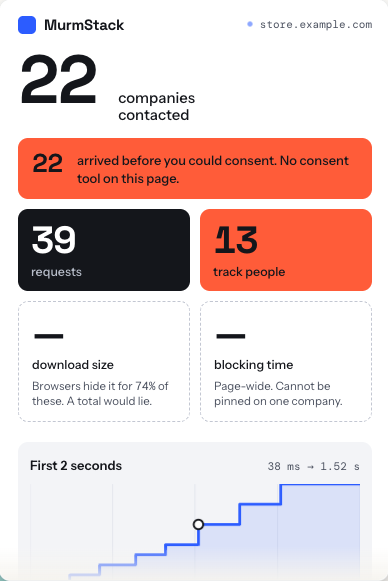
The MurmStack popup on store.example.com: 22 companies contacted, all 22 before you could consent, 39 requests, 13 that track people — and download size and blocking time drawn as dashed refusals at the same size.

MurmStack

privacy research · free

Click it on any page and it reports how many separate companies that page contacted, plotted at the millisecond each was first reached — and how many arrived before a cookie banner could realistically be answered.

  • Companies in the catalogue 243
  • Marked as tracking 70
  • Permissions 2
— download total · blocking time per company Browsers hide the transfer size of most cross-origin requests — a total built on that would understate reality while looking authoritative. The browser does not expose which script caused a long task, so blocking is reported page-wide and labelled as such.
Add to Chrome — free →→
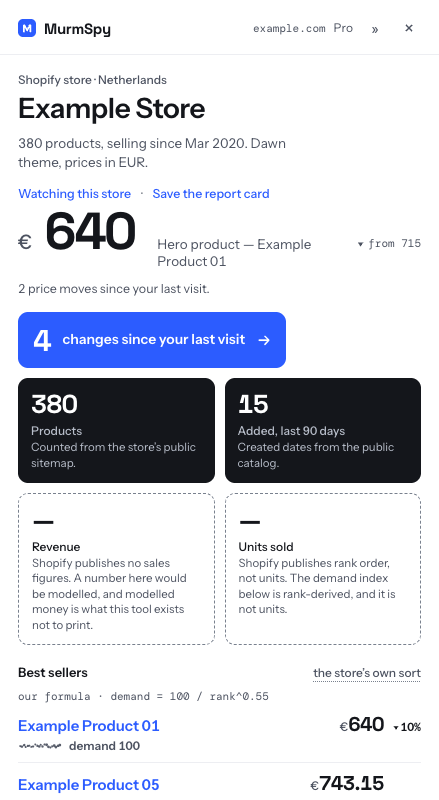
The MurmSpy popup on an example Shopify store: 380 products counted from the public sitemap, the hero product at €640, 4 changes since the last visit — and revenue and units sold drawn as dashed refusals at the same size.

MurmSpy

store research · free + pro

Store research on the storefront in front of you: best sellers in the merchant’s own order, pricing shape, app and theme detection with the evidence on the tile, and a watchlist that tells you what moved.

  • App fingerprints 137
  • Figures it refuses to model 2
  • Affiliate links, ever 0
— revenue · units sold Shopify publishes no sales figures — a number here would be modelled, and modelled money is what this tool exists not to print. Rank order is published, units are not.
Get it →→
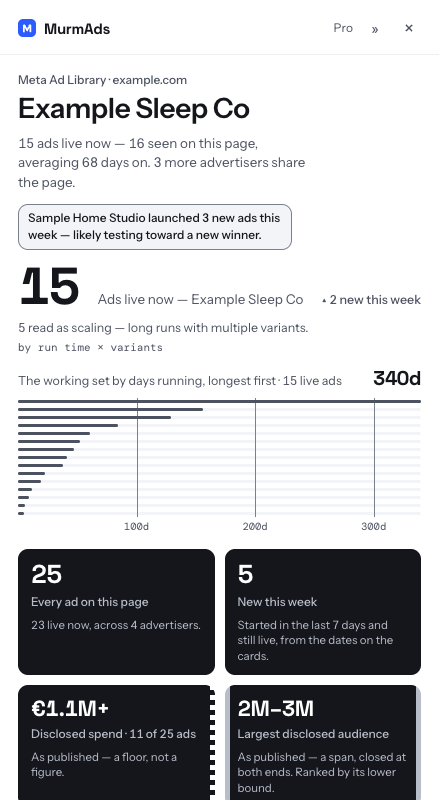
The MurmAds popup on the Meta Ad Library: 15 ads live now, 5 read as scaling by run time × variants, disclosed spend of €1.1M+ shown as a floor and the largest disclosed audience of 2M–3M kept as a span.

MurmAds

ad research · free + pro

Reads Meta’s own EU transparency disclosures on the Ad Library page. An interval stays an interval; a ceiling says only its upper end. Three of those four forms used to be printed as exact figures. They no longer are.

  • Bound forms kept distinct 4
  • Languages read 4
  • Invented figures 0
— exact spend · exact reach Meta does not publish exact spend for commercial ads. Under EU transparency rules it publishes spend and reach as ranges, and that range is the most precise figure that exists.
Add to Chrome →→
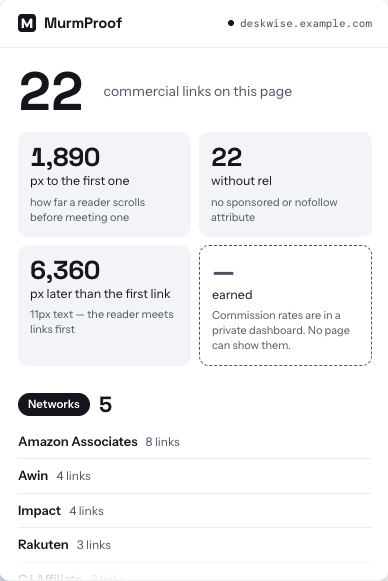
The MurmProof popup on an example page: 22 commercial links counted, 1,890 pixels of scrolling to the first one, 22 without a rel attribute — and earnings drawn as a dashed refusal at the same size.

MurmProof

disclosure research · free

Counts the commercial links on any page, reports how far a reader scrolls before meeting the first one, and measures in pixels where the affiliate disclosure sits relative to it. What a page claims, against what it discloses.

  • Affiliate networks it can name 11
  • Permissions 2
  • Earnings it estimates 0
— earnings Commission rates are agreed privately between publisher and network and appear nowhere in the page. Any per-click or per-page figure would be invented, so none is offered.
Add to Chrome — free →→

MurmSchema

structured data · free

One number on any page: how many distinct types it declares. Then the two facts that number hides, which are how many JSON-LD blocks are on the page and how many of them a parser would refuse to read.

  • Permissions 2
  • Host permissions 0
  • Health scores it prints 0
— whether a rich result will appear That is decided by the engine, not the page: by the query, the competition, the crawl, and rules that are not published and change without notice. A tool reading your markup cannot know it, so it prints the reason instead of a green tick that means nothing.
Add to Chrome · free →→

MurmPulse

velocity research · free

Every research tool in this category gives you a number. None of them gives you the derivative. This measures the change between readings you took yourself, and prints the sample count beside every figure.

  • Readings before it calls a trend 3
  • Permissions 3
  • Forecasts it prints 0
— the future No projection, no “on track for”, no dashed continuation of the line. There is no field in the code for one. A trend here is a record of what happened between readings you took, not a claim about what happens next.
Add to Chrome · free →→

MurmMargin

landed cost · free

A supplier listing shows a unit price. It does not show freight per unit, duty, import VAT, payment fees, or the number that decides whether you can advertise the thing at all: how much you can pay per sale before it stops making money.

  • Cost layers it builds 5
  • Destinations 3
  • Duty rates it invents 0
— whether it will sell Not on the page, not computable, not pretended. Duty is printed as a band with both edges rather than one confident rate, because the real rate depends on the tariff line a customs officer assigns and no extension can classify goods.
Add to Chrome · free →→

MurmCrawl

crawler research · free

Fetches the robots.txt from the site’s own origin, resolves it against each named AI crawler the way the standard says a crawler must, and tells you which are allowed, which are blocked, and which were never mentioned at all.

  • AI crawlers resolved 22
  • Permissions 2
  • Host permissions 0
— whether a crawler obeyed A robots.txt is a request, not a fence. This reports what the site asked for, never what any bot did, and it never claims to know whether your content was used for training.
Add to Chrome · free →→

the rule

A figure looks different depending on how it was arrived at.

Four marks, and they separate from a metre away before a word is read. Two of them are already on this page: the tiles at the top are drawn in exactly the vocabulary the extensions use. The other two are missing on purpose — nothing here is modelled, and nothing here is behind a paywall, so printing them would be the fabrication this whole page argues against.

Counted We enumerated it, or did exact arithmetic on figures somebody published. Set in the display face.
Computed A formula with a chosen constant in it. Never the display face, and the rule is printed underneath.
Refused No such number exists and none can be had. Drawn at the size of a finding, because declining to guess is a result.
Withheld It exists and the paid tier holds it. A hatch, never a blur — a blur promises a value is under the glass.

No colour carries any of that. Fill, outline, dash and hatch are shapes, and the second channel is the typeface. Both survive a greyscale screenshot, every colour-vision deficiency and a black-and-white printout. An earlier version used a tint, and in dark greyscale that tint measured 1.68:1 against the thing it claimed to distinguish itself from. It was removed rather than adjusted.

questions

Questions people actually ask.

Are MurmTools extensions free?

Six of the eight are free permanently with no paid tier: MurmStack, MurmProof, MurmSchema, MurmPulse, MurmMargin and MurmCrawl. MurmSpy and MurmAds have permanent free tiers plus optional Pro at €8.99/month (€69/year) and €9.99/month (€79/year), and one bundle covers both at €12.99/month or €99/year. No time-limited trials, and no account required for the free tiers.

Do MurmTools extensions send my browsing anywhere?

No. None of the eight has a backend, so there is no server to send anything to. No account, no analytics, no telemetry. Watchlists and settings live in local browser storage, and even the typefaces are bundled rather than fetched from a font host.

Why does MurmSpy refuse to show Shopify revenue?

Shopify publishes no sales figures, so any revenue number would be modelled rather than measured. MurmSpy draws a refusal there — at the same size as a real finding — instead of printing a guess. Tools that show a revenue estimate are inferring it, usually from product count and price.

How is MurmStack different from Wappalyzer or BuiltWith?

Those report what a site is built with. MurmStack reports that plus who the page contacted and when — each company plotted at the millisecond it was first reached, and how many arrived before a consent banner could realistically be answered. It uses two permissions and no host access. Side by side: MurmStack vs Wappalyzer and MurmStack vs BuiltWith.

What does MurmAds do that the Meta Ad Library does not?

It reads Meta's own EU transparency disclosures and keeps their shape: an interval stays an interval, a ceiling states only its upper end, a floor only its lower. It adds a per-ad scaling signal derived from run time × variants, with that method printed beside it.

Which browsers do these work in?

Any Chromium browser — Google Chrome, Microsoft Edge, Brave, Arc and Opera. All eight are Manifest V3 extensions, and all eight install from the Chrome Web Store.

Last updated .

Research and teardowns: Writing · Atom feed